
Dubai Municipality Housing Fee Calculation via WhatsApp (2026)

Moving into a new place in Dubai comes with a small surprise on your first DEWA bill: a line called the municipality housing fee. Plenty of tenants only notice it when the number looks bigger than expected.
The good news is you don’t have to wait for the bill to know what’s coming. Dubai Municipality has a WhatsApp service, run by a virtual assistant called Fares, and housing fee calculation is one of the options on its menu. This guide shows how to find it, how the fee is worked out, and how to check your own numbers in about a minute.
What is the Dubai housing fee?
The housing fee is an annual charge equal to 5% of a property’s yearly rent, according to Bayut’s guide. You don’t pay it separately. It’s added to your DEWA bill automatically and spread over 12 monthly instalments, shown as its own line next to electricity, water and sewerage.
Who pays depends on your situation:
- Tenants pay it, based on the annual rent in their Ejari contract.
- Expat owners living in their own home pay it, based on an estimated rental value for the property.
- Owners of vacant properties pay it when the unit has an active DEWA connection.
- UAE nationals are generally exempt for their own home, and a few other exemptions may apply.
The rules can change, so treat this as a guide and check with the municipality if your case is unusual.
How to use the WhatsApp service
Fares was introduced as a virtual employee on Dubai Municipality’s 800 900 line, and Gulf News reported that it also works on WhatsApp, the municipality’s website and its app. Here’s how to reach it:
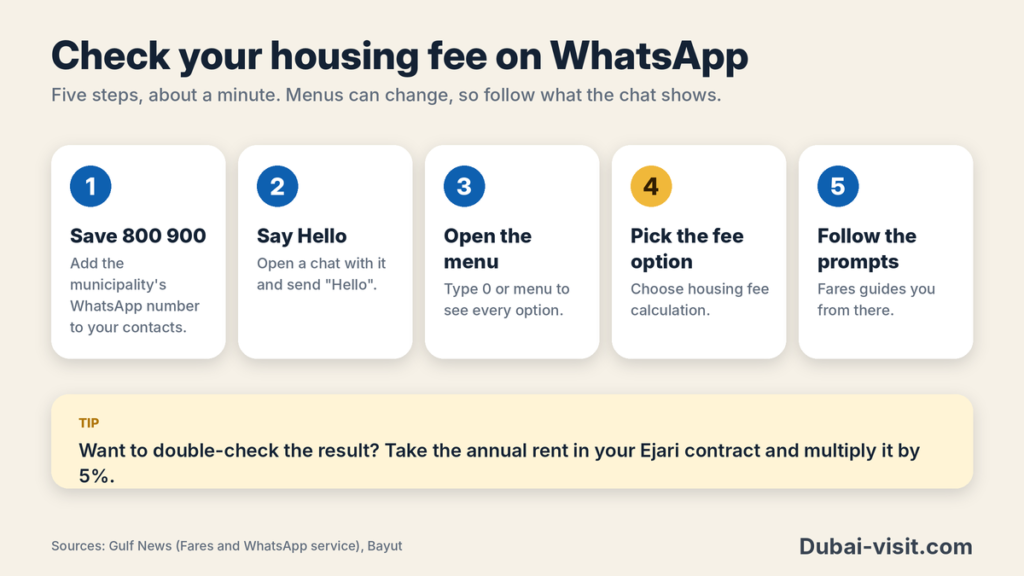
- Save 800 900 in your phone contacts, the number Gulf News lists for the municipality’s WhatsApp service.
- Open WhatsApp, start a chat with that contact and send “Hello”.
- Wait for Fares to reply. You can type your question or pick from its menu.
- Type “0” or “menu” to see every option again.
- Choose the housing fee calculation option and follow the prompts.
The menu also covers tracking a request, reporting an incident, and checking whether a rumour about the municipality is true.
One honest note: the articles I found confirm the housing fee calculator is on the menu, but they don’t spell out the exact questions Fares asks. Menus can change over time, so if yours looks different, follow what it shows. You can always reach the team on 800 900 or through the Dubai Municipality app and website.
How to work out your housing fee yourself
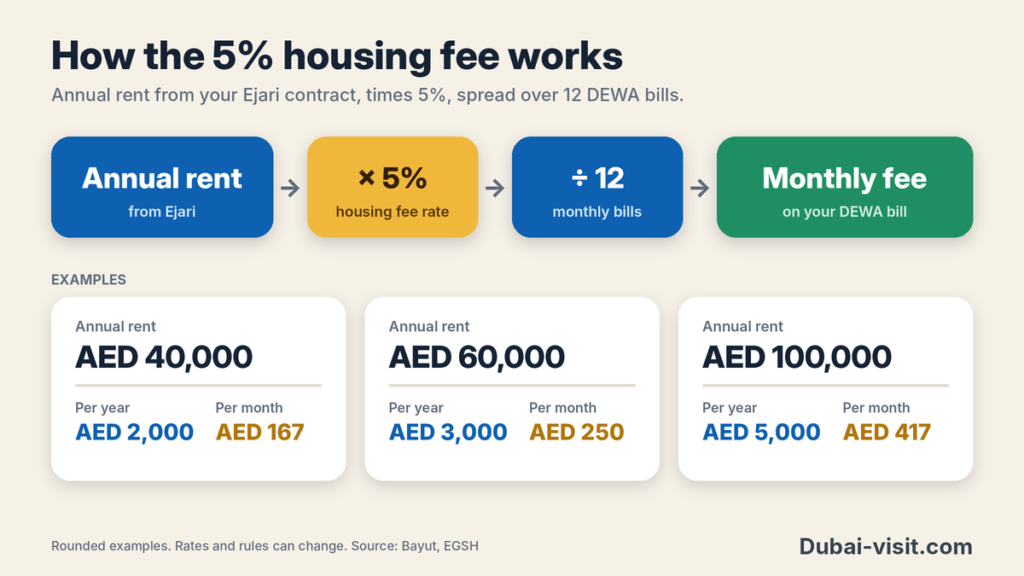
You can double-check whatever Fares tells you with simple maths. Take your annual rent from your Ejari contract, multiply it by 5%, then divide by 12 for the monthly amount on your DEWA bill.
| Annual rent (AED) | Yearly fee (AED) | Monthly on DEWA bill (AED, approx.) |
|---|---|---|
| 40,000 | 2,000 | 167 |
| 60,000 | 3,000 | 250 |
| 100,000 | 5,000 | 417 |
As a reference point, Bayut gives the example of AED 50,000 in rent, which comes to AED 2,500 a year, or about AED 208 a month.
If you own the home you live in, there’s no rent to use. The fee is based on an estimated rental value instead, and Bayut says owners can get a rough idea from the RERA rent calculator.
Tips and common problems
The number looks wrong. Start with your Ejari contract. The fee follows the rent registered there, so if your amount doesn’t match 5% of that rent, the basis used for your bill may be out of date.
Your rent changed. After a new contract, a renewal at a different rent or a property detail correction, you can ask for an amendment on the Dubai Municipality website or app, or through DubaiNow. Log in with UAE Pass, go to the Dubai Municipality fees service, and apply to amend the residential fee. You’ll need your DEWA account number, premise number and the updated rental value, plus your tenancy contract or title deed. EGSH’s guide says the update is processed within three working days.
Your rent went down. Update your Ejari registration first, then request the reduction.
You were overcharged. Overpayments are refunded as a credit on your DEWA account, and refund requests can be made at refundfees.dm.gov.ae, according to Bayut.
Stay on official channels. Check the number against the Dubai Municipality app or website before you share any personal details in a chat.
And don’t ignore the line on your bill. Unpaid housing fees can lead to late surcharges and, in the worst case, disconnection of water and electricity.
Quick answers
1. How much is the housing fee?
5% of the annual rent, split into 12 monthly instalments on your DEWA bill.
2. Can I calculate it on WhatsApp?
Dubai Municipality’s WhatsApp service (Fares, on 800 900) lists housing fee calculation among its options.
3. Do I pay it separately?
No. It’s added to your DEWA bill automatically.
4. Who is exempt?
UAE nationals are generally exempt for their own home.
5. How do I fix a wrong amount?
Apply for an amendment on the Dubai Municipality app or website, or DubaiNow, using UAE Pass.
The bottom line
The housing fee isn’t hard to understand once you see the formula: 5% of your annual rent, shared across your monthly DEWA bills. A quick message on WhatsApp, or two minutes with a calculator and your Ejari contract, tells you what to expect before the first bill lands. If something looks off, fix it early, because amendments and refunds are easier to sort out when you catch them quickly.
Sources
- All about the Dubai Municipality housing fee (Bayut)
- Dubai Municipality Housing Fee: Charges, Instalments & More (dubizzle)
- Dubai Housing Fee: How the 5% DEWA Charge Works 2026 (EGSH)
- UAE residents can now ask Fares, the virtual assistant of Dubai Municipality, for services (Gulf News)
- Dubai Municipality’s new WhatsApp service: all the information you can receive (Gulf News)
- Dubai Municipality official website